
Welcome to the Seminole Gaming + RedeApp experience
The stakes are high, the pace is fast, and communication is everything. With RedeApp, you'll be dealt a winning hand, connecting you to your team, your tools, and everything you need to stay in the game.
Whether you're on the casino floor, behind the scenes, or working with guests, RedeApp helps keep the operation rolling smoothly. No more chasing down updates or playing phone tag, just instant, secure, and organized communication.
Let's hit the jackpot together.
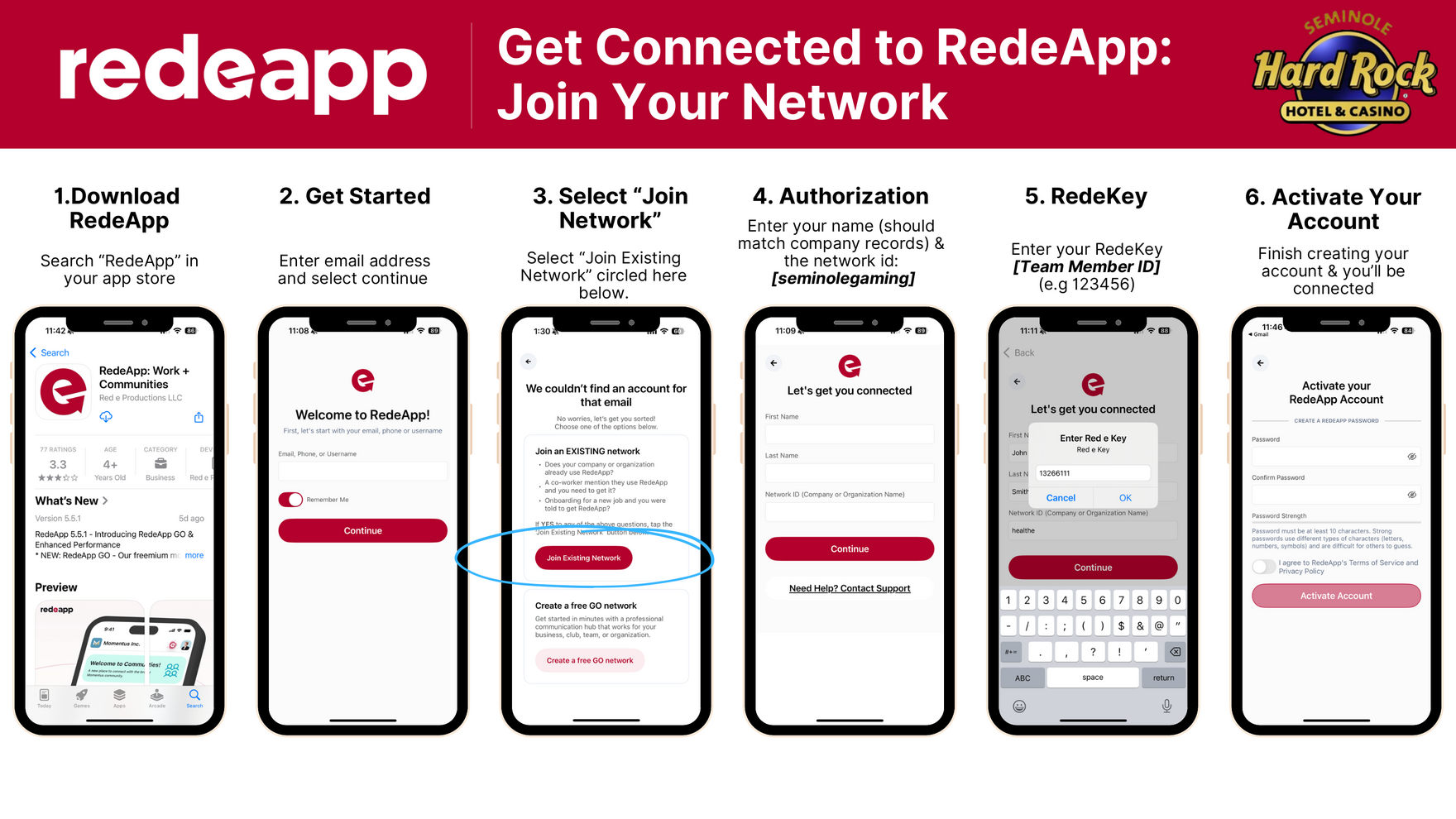
If you can't see the image or instructions clearly, don't worry, we've laid out every step right here. Think of it as your backstage pass to the show.
Get connected in 6 simple steps
-
1
Download RedeApp
Search "RedeApp" in the App Store or Google Play.
-
2
Get started
Enter your email address and tap Continue.
-
3
Select "Join Network"
Tap the link that says: "Does your group or organization use RedeApp? Tap HERE to join!"
-
4
Enter your info
Type in your name (as it appears in company records) and enter the Network ID:
seminolegaming -
5
Enter your RedeKey
Use the unique RedeKey provided to you by your manager (for example,
123456). -
6
Activate your account
Create your RedeApp password and you're in!
What's inside: your digital command center
- HR resources from benefits to onboarding
- Team communication stay in sync across departments
- Documents and forms safety, operations, and more
- Daily briefings start each shift with what matters
- File access everything from SOPs to protocols
Got feedback?
We're always leveling up. Share your ideas on how RedeApp can make your shift smoother, faster, and even more rockin'. Head to the Forms section or the Home Tab to submit feedback, no line at the front desk required.
Need help?
Our RedeApp support crew is on call and ready to assist. Email us anytime at support@redeapp.com, no tech jargon or hotel code needed.